Powered by TallyPrime

Your Tally Data —
On Mobile. On Web. Anywhere.

BizView Pro puts your TallyPrime data on your phone or browser — check outstanding, sales, and stock instantly, and even create, edit or delete vouchers remotely. Automated WhatsApp payment reminders and AI stock alerts included.

Login to Portal Download Sync Agent See Features
∞
Vouchers Synced
Real-Time
Data Sync
Any Device
Mobile, Tablet, Desktop
WhatsApp
Share Statements
Secure
Encrypted Sync

Everything your business needs

A complete business intelligence layer on top of TallyPrime — accessible from your phone, tablet, or browser.

Auto Tally Sync

Install the lightweight Windows agent on your Tally PC. It auto-syncs vouchers, ledgers, and stock in the background — no manual export needed.

Create & Edit Vouchers Remotely

Don't just view your Tally data — act on it. Create new Payment, Receipt, Sales and Purchase vouchers from the portal, or edit and delete an existing one — every change syncs straight back into Tally.

Voucher Restore & History

Made a mistake? Every voucher you edit or delete through the portal keeps a full version history — see exactly what changed and when, and restore an earlier version in one click.

Live Dashboard

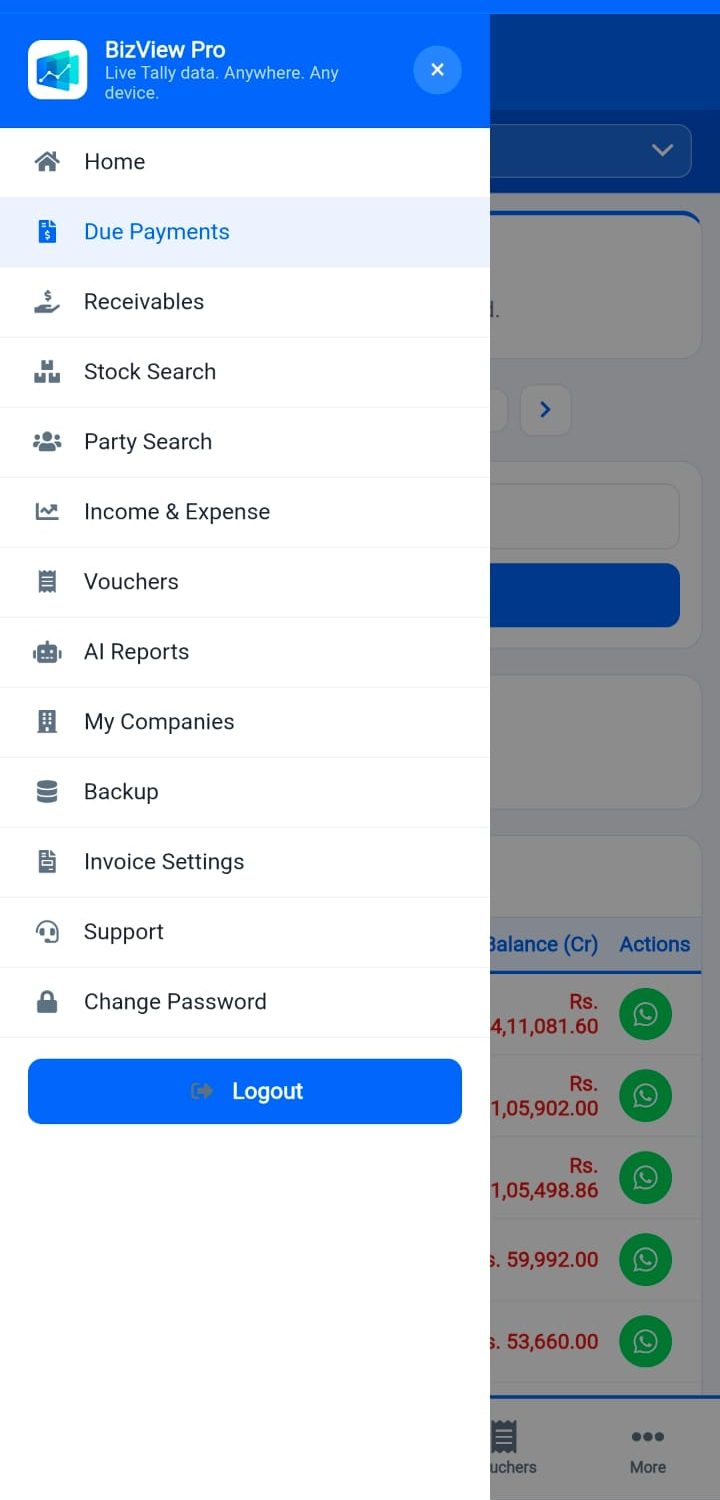
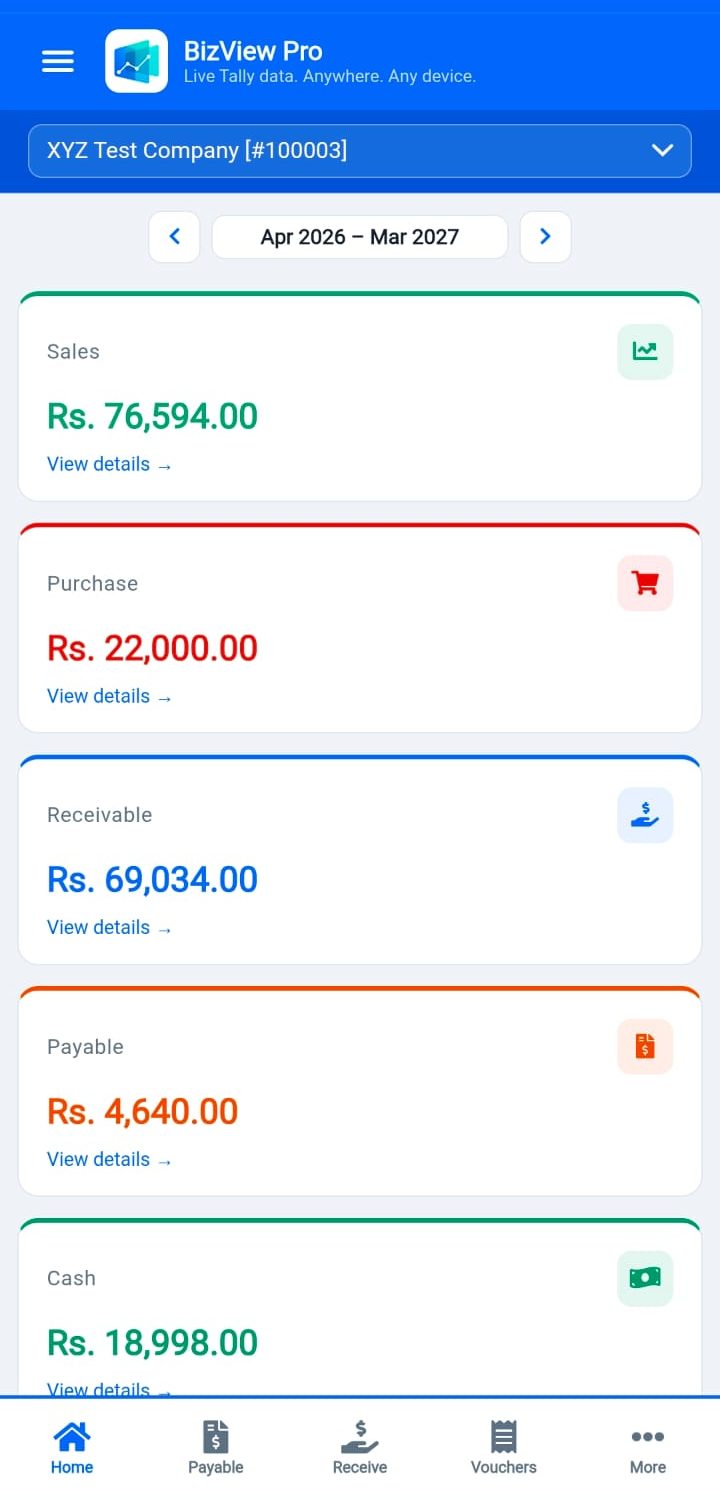
View Sales, Purchase, Cash, Bank, Receivables, Payables, Credit Notes, Debit Notes — all on one mobile-friendly dashboard updated after every sync.

Receivables & Automated Reminders

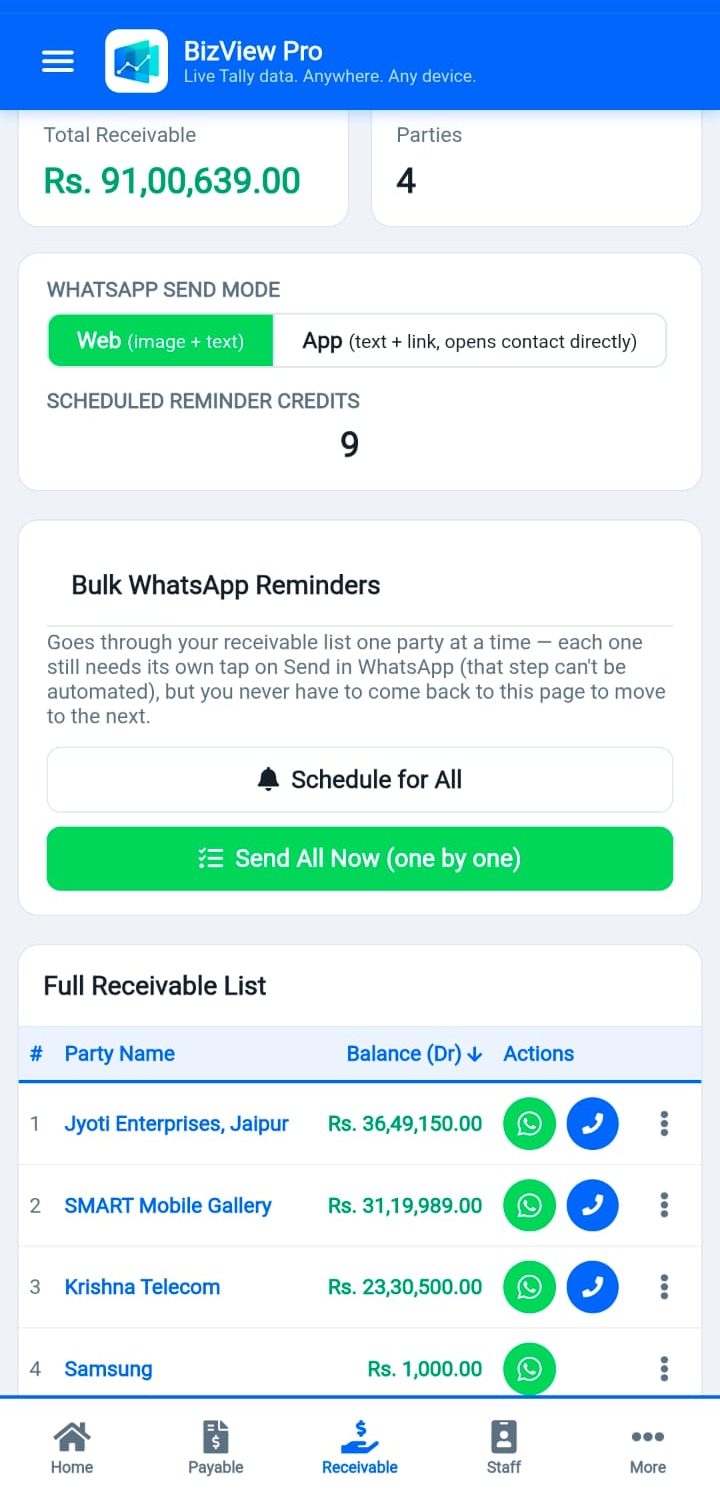
See outstanding dues instantly, and send a WhatsApp payment reminder in one tap — or schedule automatic recurring reminders (weekly or monthly) that stop by themselves once a party pays.

Stock Intelligence

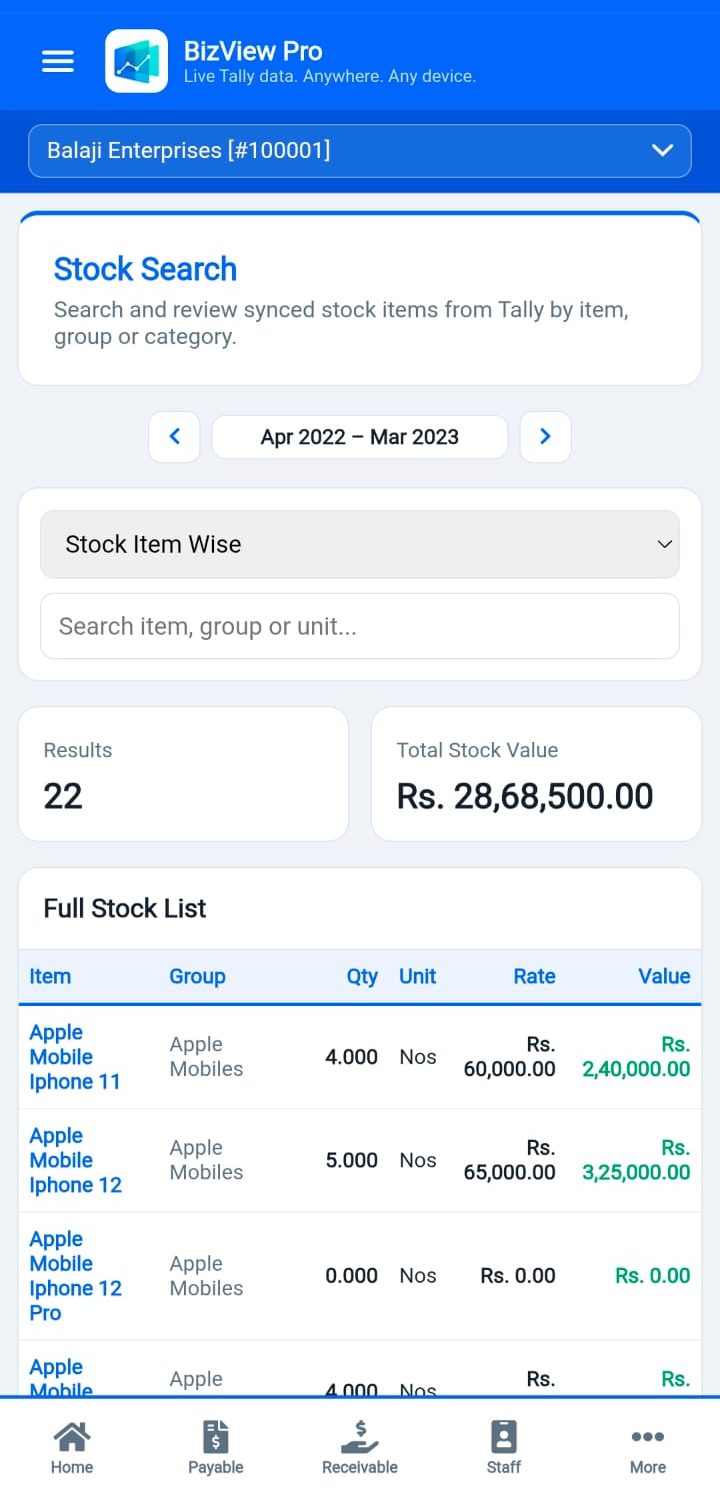
View stock group-wise, item-wise, and batch-wise details. AI-powered restock alerts show items running low based on last 15 days of sales.

Voucher View & Share

Browse all voucher types — Sales, Purchase, Payment, Receipt, Journal, Credit Note, Debit Note. Share any voucher on WhatsApp instantly.

Profit & Loss Report

Full P&L report matching Tally's format — Income, Expense, Opening Stock, Closing Stock, Gross Profit and Net Profit, FY-selector included.

AI Reports

Smart restock urgency list, top loyal buyers, and product-pairing insights that show what customers tend to buy together — paginated for large catalogues.

Mobile-First PWA

Works perfectly on any mobile browser. Add to Home Screen as an app (PWA) for instant access — no app store needed.

Staff Attendance & Payroll

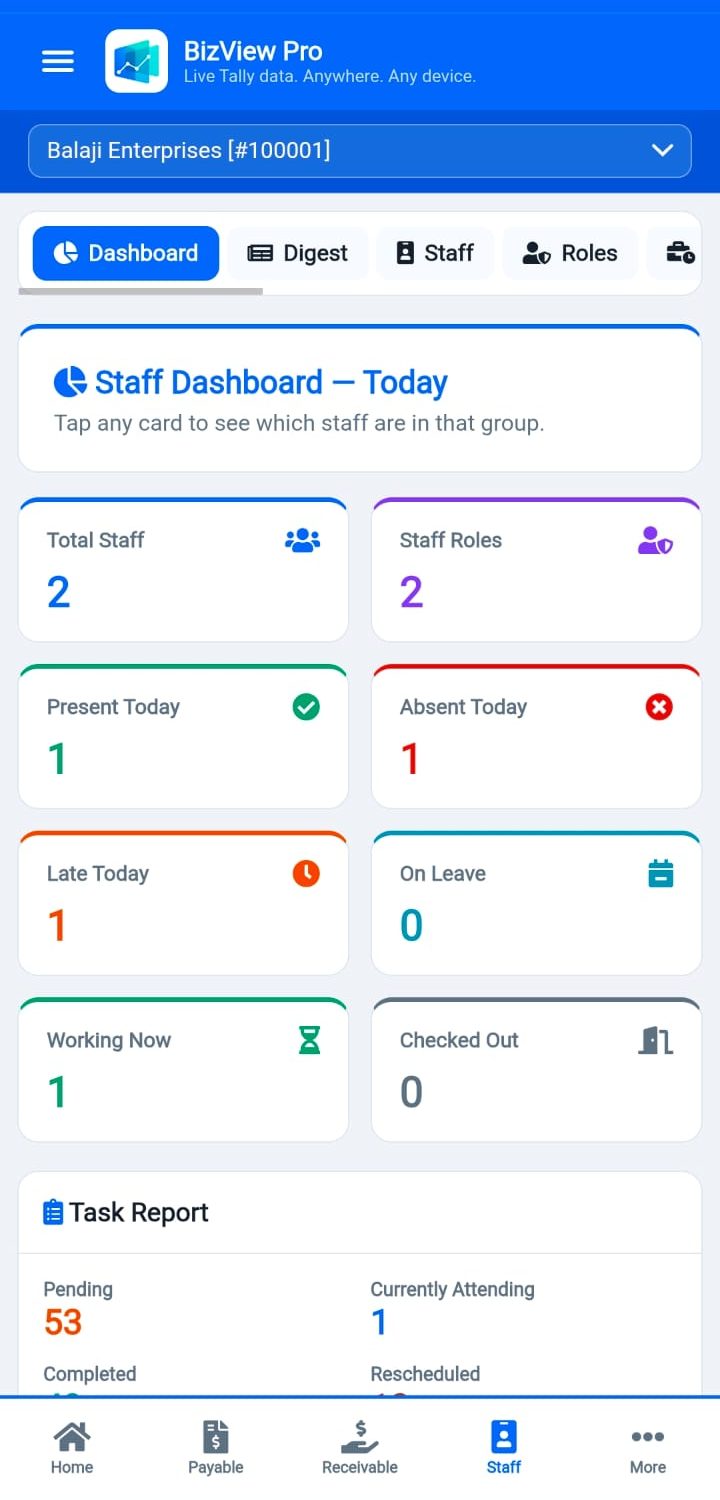
GPS-based staff attendance, shift management, leave tracking, and automatic salary calculation — manage your team from the same portal as your Tally data.

Staff Task Assignment & Tracking

Assign one-off or recurring tasks to staff, track pending vs. completed in real time, and use a built-in task suggestion library to set up recurring work in seconds.

Multi-Company

Switch between multiple Tally companies from one login. Each company's data is completely isolated and secure.

Secure & Encrypted

Data sync is encrypted end-to-end. Sessions last 30 days. Hosted on your own server — your data stays yours, not a shared third-party cloud.

Backup & Restore

One-click backup to server database. Download any of the last 10 backups from the portal. Restore guide included.

Dedicated Support

WhatsApp and email support from Raj Systems & Technologies. Support hours and contact always available from the portal.

Up and running in minutes

Four simple steps — no technical knowledge required.

1

Get Your Account

Subscribe to BizView Pro and receive your login credentials and portal URL.

2

Install Sync Agent

Download and install the lightweight BizView Pro Sync Agent on your Tally PC. Runs silently in the background.

3

Connect & Configure

Paste your config key into the agent, click Connect — it detects all open Tally companies automatically.

4

Access Anywhere

Open the portal on any phone, tablet or browser. Your live Tally data is ready instantly.

Live Portal Preview

What you'll see inside

Real screens from a live BizView Pro portal — not mockups.

Simple, transparent plans

Choose the plan that fits your business size. All plans include full portal access and sync agent.

Starter
Contact for price
Perfect for small businesses with one Tally company.
  • 1 Tally Company
  • Full portal access
  • WhatsApp sharing
  • Mobile PWA
  • Email support
Get Basic
Enterprise
Contact for price
For large businesses and accounting firms.
  • Unlimited Companies
  • Custom branding
  • All features included
  • Dedicated support
  • Custom integrations
Get Enterprise
Trusted by Businesses

What our users say

★★★★★

"BizView Pro has completely changed how I monitor my business. I can check my sales, receivables and stock from my mobile while I'm on the road. My accountant and I are always on the same page."

R
Rajesh Gupta
Electrical Goods Trader, Mathura
★★★★★

"The WhatsApp payment reminder feature saves me so much time. I used to call each party — now I just tap and send a professional reminder from the receivables page."

S
Sunita Sharma
Wholesale Distributor, Agra
★★★★★

"The AI restock alert is brilliant. It automatically shows which items I need to purchase based on recent sales. I never run out of fast-moving stock anymore."

M
Manoj Verma
Hardware & Plumbing Supplier

Common questions

Can I see my Tally outstanding (receivables and payables) on mobile?

Yes. Once the sync agent is installed on your Tally PC, BizView Pro shows live receivables and payables on your phone, updated after every sync — no need to open Tally or a laptop. See how it works →

Do I need to install an app on my phone?

No app-store download needed. BizView Pro is a mobile-friendly web portal (PWA) — open it in your phone's browser and add it to your home screen for one-tap access, like a native app.

Can I create or edit a voucher from my mobile, and will it reflect in Tally?

Yes. Unlike most Tally-on-mobile apps that are view-only, BizView Pro lets you create, edit or delete Payment, Receipt, Sales and Purchase vouchers directly from the portal — they sync into your actual Tally on the next sync.

What if I accidentally delete or wrongly edit a voucher?

BizView Pro keeps a full version history of every voucher you edit or delete through the portal, so you can see exactly what changed and restore an earlier version if needed.

Is my Tally data safe if I use BizView Pro?

Your data syncs to a portal hosted on your own server — not a shared third-party cloud — and the connection between your Tally PC and the portal is encrypted end-to-end.

See all FAQs →

Ready to see your Tally data everywhere?

Get started with BizView Pro today — sync your first company in under 10 minutes.

Login to Portal

Get in touch

Have questions? Want to subscribe? Reach out on WhatsApp or email — we respond fast.

WhatsApp Us

bizviewpro.in  ·  Mon–Sat, 10 AM – 7 PM

Download

Get the Sync Agent

Install on the Windows PC where TallyPrime is running. One-time setup — works silently in the background.

Download BizView Pro Sync Agent .zip
Windows 7/10/11 · 64-bit · Safe & virus-free